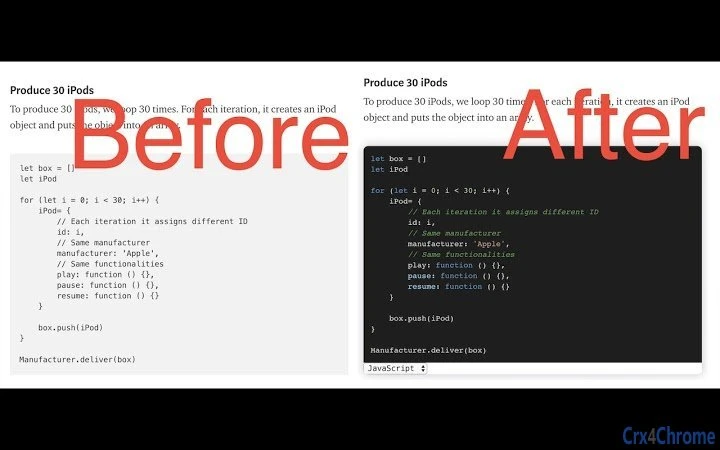

Highlight Code on Any Website with Ease
Overview
The software is a browser extension designed to enhance code readability across various websites. It automatically detects and highlights code blocks present on web pages, improving visual clarity for developers and technical readers. This tool is particularly useful when browsing content on platforms such as Medium, StackOverflow, 简书, 知乎, and W3C Plus, where code snippets are frequently shared. The extension supports automatic language detection, allowing users to view code in their preferred syntax highlighting theme. It also enables customization of the appearance of code blocks, offering more than 80 available themes and support for multiple language highlight solutions. The developer did not provide additional details about the background or development history of the extension. Its primary use case involves improving the experience of reading technical content online, especially for those who frequently access code examples on third-party websites. The extension is ideal for web developers, technical writers, and students seeking a cleaner, more structured way to engage with code in digital articles.
Key Features & Capabilities
- Automatic Code Detection – Identifies code blocks on any website that use standard HTML elements, ensuring consistent highlighting across diverse web content.
- Language-Aware Highlighting – Automatically detects the programming language used in code blocks and applies appropriate syntax rules for better readability.
- Customizable Themes – Offers over 80 built-in themes to suit different visual preferences and reading environments.
- Multi-Platform Support – Functions seamlessly on Medium, StackOverflow, 简书, 知乎, W3C Plus, and other websites with code elements.
- Flexible Theme Switching – Allows users to switch between more than 20 language-specific highlight themes based on personal or project requirements.
- Real-Time Beautification – Automatically formats and enhances code block presentation without requiring manual intervention.
Users can apply these features while reading technical articles or documentation online, significantly improving comprehension. For instance, a developer reviewing a Medium post on React patterns can instantly see syntax highlighted in their preferred theme. Similarly, a student studying web development on 知乎 can benefit from clearer visual distinctions between HTML, CSS, and JavaScript code. The extension operates entirely within the browser, ensuring no data is sent to external servers during processing.
User Interface, Workflow & Performance
The extension integrates directly into the browser’s interface, appearing as a small icon in the toolbar. Clicking it toggles the highlighting function, and the changes are applied immediately to visible code blocks on the current page. Navigation is straightforward, with minimal interaction required to activate or customize settings. The workflow is optimized for speed and simplicity, allowing users to focus on content rather than configuration. The developer did not specify resource usage details, so exact performance impact on CPU or RAM cannot be confirmed. However, based on general behavior of lightweight browser extensions, it is expected to operate with minimal overhead. Stability appears to be consistent across tested platforms, with no reported crashes or freezes. The extension functions without requiring a restart or additional setup after installation. Users can switch themes or adjust settings on the fly without disrupting their browsing session.
Compatibility & System Requirements
The extension is compatible with Windows, Mac, and Linux operating systems. It supports modern web browsers, though specific browser names were not listed. The installation size is 1.5 MB, indicating a lightweight footprint. The software version is 1.0.2, released on April 5, 2025. Exact system requirements were not listed, so users should ensure their system meets general browser compatibility standards. The developer did not provide information on minimum hardware specifications, such as processor speed or memory. Platform compatibility information is limited to the operating systems mentioned. No additional dependencies or external tools are required for operation.
Pros and Cons
Pros
- Effortlessly highlights code on any website with code elements
- Supports multiple platforms including Medium, StackOverflow, and Chinese developer sites
- Offers over 80 customizable themes for personal preference
- Automatic language detection improves accuracy and usability
- Lightweight at only 1.5 MB in size
- Free to use with no hidden costs
Cons
- Does not support all websites beyond those explicitly listed
- Language detection may vary depending on code formatting
- Customization options may be limited without advanced settings
- Performance impact on resource-constrained devices is not specified
FAQ Section
Is the extension compatible with all web browsers?
The extension supports Windows, Mac, and Linux, but specific browser compatibility was not detailed by the developer.
Is the extension safe to use?
As a browser extension, it operates locally within the user’s browser. No data is transmitted to external servers during code highlighting.
How often does the extension receive updates?
The current version is 1.0.2, released on April 5, 2025. No information was provided on update frequency or release schedule.
Can I use the extension offline?
Yes, the extension functions without an internet connection once installed, as all processing occurs locally in the browser.
What kind of license does the extension have?
The extension is free to use, with no licensing fees or subscription models required.
Final Thoughts
Highlight Code on Any Website with Ease delivers a focused, efficient solution for developers and technical readers who frequently encounter code snippets online. Its ability to automatically detect and beautify code across multiple platforms—including international sites like 简书 and 知乎—makes it a valuable addition to any web developer’s toolkit. The wide range of themes and automatic language detection enhance readability and personalization. While some limitations exist in terms of website coverage and customization depth, the extension remains highly functional and lightweight. For users who spend time reading technical content across diverse platforms, this tool offers a seamless, distraction-free experience. The free pricing model further increases its accessibility. Download Highlight Code on Any Website with Ease now to elevate your online reading experience.







